The Clarinet BBoard The Clarinet BBoard
|
Author: clarnibass
Date: 2026-10-29 14:36
Hi
I'm considering buying an tablet and a pedal for reading sheet music, looking for recommendations and/or more info about the different specs and how important they are (or not).
Only Android, not Apple even though it's recommended as the best option.
It will be used mainly for reading music (including in concerts) and maybe the occasional film, meaning it's not going to be used as a regular phone/computer or anything like that.
A little concerned about size vs. regular A4 paper. Is it possible to crop somehow on the tablet itself to maximize the screen size?
Looks like a minimum 13" tablet will be close to A4, maybe preferably 14" (getting a bit large). These sizes are pretty expensive for the known companies but there are some much less expensive ones... not sure how reliable they are. They are FHD rather than around 3K resolution for some Samsungs.
I play nearly only my own parts or parts written for me, so traditional classical parts are less important. I try to make sure the pages are organized so there are places to turn comfortably, but I am also used to having two or even three pages at the same time.
The main advantages and the reasons I'm considering it are no real wind, light or noise issues, and not having to re-print parts many times after fixing mistakes, making changes, etc. constantly wasting papers...
Thanks
|
|
Reply To Message
|
|
Author: concertmaster3
Date: 2026-10-29 17:15
The Samsung S series are great tablets. I bought my Tab S9 Ultra on eBay and it's been an amazing tablet. It's at 14" screen. I use it for conducting a band also, and I can see parts well. In my normal playing, it's more than enough tablet to see everything. While it's large, at 42 I really appreciate the size, even with very good vision thanks to lasik eye surgery!
One of my students is using my previous tablet, a Tab S7+. It was a great size until I needed to read scores from it. And while technically I was able to read them fine, the extra size has been very helpful!
If it helps, I've been using android tablets for music since 2011.
The Donner page turner has also been great. It's easy on and off, turns off automatically if not touched in a while, and doesn't break the bank.
Ron Ford
Woodwind Specialist
Performer/Teacher/Arranger
http://www.RonFordMusic.com
|
|
Reply To Message
|
|
Author: SecondTry
Date: 2026-10-29 19:44
Attachment: tablet.pdf (204k)
clarnibass wrote:
I've attached a copy of guidance someone gave me that I followed and in turn altered to reflect changes since I received it.
> A little concerned about size vs. regular A4 paper. Is it
> possible to crop somehow on the tablet itself to maximize the
> screen size?
Using the MobileSheets software I recommend, absolutely and easily.
>
> Looks like a minimum 13" tablet will be close to A4, maybe
> preferably 14" (getting a bit large). These sizes are pretty
> expensive for the known companies but there are some much less
> expensive ones... not sure how reliable they are. They are FHD
> rather than around 3K resolution for some Samsungs.
As a clarinetist reading a line a time I recommended Amazon 10, with its 10.1" screen is more than enough. It's $73 right now on Amazon.
>
> I play nearly only my own parts or parts written for me, so
> traditional classical parts are less important. I try to make
> sure the pages are organized so there are places to turn
> comfortably, but I am also used to having two or even three
> pages at the same time.
I am reading this, perhaps incorrectly, as "but I am also used to having (to turn) two or even three pages at the same time."
If so, it's trivial in MobileSheets to establish these things called "links" that appear as translucent colored dots on the page. You touch them on the screen with a finger, (or easily configure say a left foot pedal press to be the same as touching them on the screen with a finger) and you're instantly brought to the location you set this link to take you to. I have my left foot pad set to do this, and my right one to advance the page: the later being something the software can be set to automatically do for you if what you're playing has a constant speed.
>
> The main advantages and the reasons I'm considering it are no
> real wind, light or noise issues, and not having to re-print
> parts many times after fixing mistakes, making changes, etc.
> constantly wasting papers...
>
Yep, some but by no means all the good reasons to make this move.
Post Edited (2026-10-29 19:47)
|
|
Reply To Message
|
|
Author: lydian
Date: 2026-10-29 21:49
Although I use a Lenovo P12, which is great, the TCL NxtPaper 14 is the best music reading tablet I've ever seen, and is very affordable. No need for fancy pedals either. Any one will work. I used just a single button one, the PT23. I wish I had gotten white instead of black though since mine is hard to see in the dark.
I second the recommendation for MobileSheets. Been using it for years in many bands with thousands and thousands of charts.
I used a 10.1 for a while, and it worked ok. But I'm much more comfortable on a 12+, especially at my age and with my poor vision. Maybe 10.1 is good enough if you're still young and have great vision.
|
|
Reply To Message
|
|
Author: David H. Kinder
Date: 2026-10-29 23:02
I don't use a tablet. I use a 13.3" Dell Latitude 7390 2-in-1 touchscreen laptop instead of a tablet.
Pros:
1) I can use it for everything because it runs Windows.
2) I use a digital pen to mark up my music. This is better than the rubber tip 'stylus' that often comes with inexpensive tablets (and yes I tried a couple, but immediately sent them back).
Cons:
1) Even with a new battery, it won't have the same battery life as a tablet (often 8+ hours). I can confidently expect 3-4 hours. I also have a power bank that can recharge the battery (keep it charged) 2.5 times. This is helpful for longer rehearsals and traveling.
2) Weight. It's about 3 lbs and can take its toll on you and on your music stand. I bought a Manhasset Shaft Lock for my Voyager stand to help ensure that I can keep it at the height I prefer. It does stay in place, but if I swivel the stand, it tends to sink. With the shaft lock, it's far more secure and stable.
I use an inexpensive bluetooth two-pedal unit to turn pages back and forth.
I also use MobileSheets. There were times when the pedal would advance the pages too quickly. This was what I did:
Pedal settings > Pedal Actions
- Debounce: half-second
- Scroll speed: Fast (not immediate)
- Fixed Duration: 1 seconds
Ridenour AureA Bb clarinet
Ridenour Artist MT36 mouthpiece
Vandoren Optimum black ligature (plate 1)
Vandoren Traditional #3.5 reeds
Brad Behn HR adjustable barrel
|
|
Reply To Message
|
|
Author: clarnibass
Date: 2026-10-30 18:48
Thanks everyone. A few clarifications and follow ups...
>> While it's large, at 42 I really appreciate the size, even with very good vision thanks to lasik eye surgery! <<
>> I used a 10.1 for a while, and it worked ok. But I'm much more comfortable on a 12+, especially at my age and with my poor vision. Maybe 10.1 is good enough if you're still young and have great vision. <<
I don't plan on having surgery. I still use my regular "far" glasses (not sure how you call those in English) to read music. In the last couple of years I noticed I can't focus as close as I could, but it's still very good and I don't need reading glasses. I also can't focus as close as before with the "far" glasses but no issues yet. This is why I rather have a large tablet (around A4 size) at the expense of weight, etc.
Anyway reading music is still "far glasses" distance...
>> The Donner page turner has also been great. It's easy on and off, turns off automatically if not touched in a while, and doesn't break the bank. <<
>> No need for fancy pedals either. Any one will work. I used just a single button one, the PT23. I wish I had gotten white instead of black though since mine is hard to see in the dark. <<
Is it quiet? I was told by several people that there is a significant difference in noise between different pedals. Can you set it to not turn off? I definitely wouldn't want it turning off suddenly while playing... I usually don't like gadgets that can't be set to not turn off automatically, or at least change the amount of time this takes (at least if they have a very long duration for this).
>> As a clarinetist reading a line a time I recommended Amazon 10, with its 10.1" screen is more than enough. It's $73 right now on Amazon. <<
I definitely wouldn't want anything smaller than a 12" tablet at the absolute minimum.
>> I am reading this, perhaps incorrectly, as "but I am also used to having (to turn) two or even three pages at the same time." <<
I meant I often put two or three pages next to each at the same time. I'll give an example of how I like to do it: Say the entire piece is four pages. When I edit and organize the part I make sure the 2nd and 3rd pages have a good place to turn (such as a couple of rest bars, a place I only need my left hand to play, etc.), then I have page 1 and 2, with 3 and 4 right behind page 2. While I'm on page 2 I move it to the left, then the same for page 3. I prefer this over gluing the pages like a book and flipping, and I do this even for pieces with many more pages.
Only having one page in front of you is trickier in that respect.
>> I use a digital pen to mark up my music. This is better than the rubber tip 'stylus' that often comes with inexpensive tablets (and yes I tried a couple, but immediately sent them back). <<
What's the difference? Can you use the digital pen with a tablet or is it specific to touchscreen laptops for some reason?
Regardless, for this I definitely don't want another laptop, only a tablet.
|
|
Reply To Message
|
|
Author: SecondTry
Date: 2026-10-30 19:18
clarnibass wrote:
> This is why I rather have a large
> tablet (around A4 size) at the expense of weight, etc.
> Anyway reading music is still "far glasses" distance...
>
Unless you need to see a considerable number of musical staff lines concurrently, IMHO width (as in a 10.1" held sideways) is the key measurement, which is 9.69" That's wider than A4 or 8" x 11" paper in portrait mode, meaning music can appear bigger on the tablet than in real life.
>
> Is it quiet? I was told by several people that there is a
> significant difference in noise between different pedals.
This Airturn model makes the tiniest of click sounds when you press it https://tinyurl.com/j2tajez3. This slightly more expensive pedal from them is completely silent https://www.amazon.com/dp/B09TX3VS59?ref_=ppx_hzsearch_conn_dt_b_fed_asin_title_2.
> Can
> you set it to not turn off? I definitely wouldn't want it
> turning off suddenly while playing... I usually don't like
> gadgets that can't be set to not turn off automatically, or at
> least change the amount of time this takes (at least if they
> have a very long duration for this).
Fully charged, and bluetooth connection established, these pedals just don't turn off on their own. It's never been a problem. You can also configure the tablet to never go into sleep mode while MobileSheets is displaying music if you'd like.
> >> As a clarinetist reading a line a time I recommended Amazon
> 10, with its 10.1" screen is more than enough. It's $73 right
> now on Amazon. <<
>
> I definitely wouldn't want anything smaller than a 12" tablet
> at the absolute minimum.
How big do you need the music to appear? Bigger than the original? How many staff lines do you need to see concurrently? At $73 a pop my Amazon Fire is cheaper than some of the replacement batteries for other tablets suggested.
Recently, after years of service, one's battery wasn't holding charge anymore. I went on Amazon and ordered another. As an Amazon product it came to my door between 2 - 4AM before I woke up the next day, not that I needed it so soon because at $73 I can afford to have two (or five) of them.
>
> I meant I often put two or three pages next to each at the same
> time. I'll give an example of how I like to do it: Say the
> entire piece is four pages. When I edit and organize the part I
> make sure the 2nd and 3rd pages have a good place to turn (such
> as a couple of rest bars, a place I only need my left hand to
> play, etc.), then I have page 1 and 2, with 3 and 4 right
> behind page 2. While I'm on page 2 I move it to the left, then
> the same for page 3. I prefer this over gluing the pages like a
> book and flipping, and I do this even for pieces with many more
> pages.
> Only having one page in front of you is trickier in that
> respect.
Sigh, lol, you have described a page turning methodology centered around increasing the ease with which you get to pages in light of playing an instrument that requires both hands. This is all moot when page turns are controlled by a foot or MobileSheets is set up to advance the music for you. And BTW these two settings are not mutually exclusive. You could have MobileSheets advance the music for you and adjust its scrolling up or down with your foot concurrently.
>
> >> I use a digital pen to mark up my music. This is better than
> the rubber tip 'stylus' that often comes with inexpensive
> tablets (and yes I tried a couple, but immediately sent them
> back). <<
I have both. In my case the stylus required energy. Its battery needed to be charged. The rubber tip stylus does not, and with one less thing to go wrong, I opted for the latter. The person who made these comments may be addressing different things.
|
|
Reply To Message
|
|
Author: David H. Kinder
Date: 2026-10-30 21:30
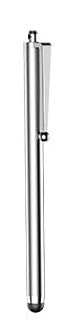
Attachment: Soft Rubber Stylus.jpg (4k)
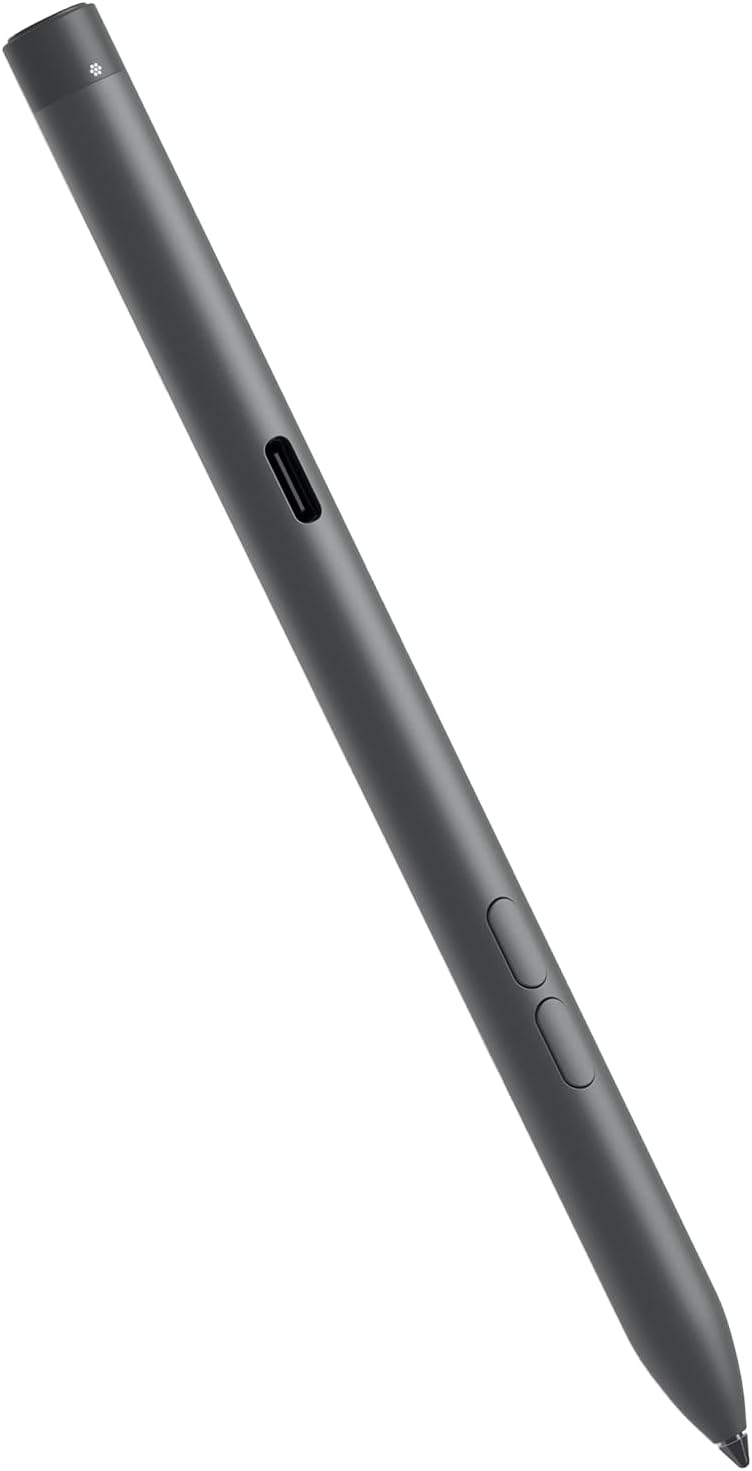
Attachment: Digital Pen.jpg (20k)
Not everything called a 'stylus' is the same.
The one that came with my tablet (that I returned) was far more of a soft rubber tip probably best for 'hunt and peck' typing or selecting icon apps, etc.
I use a Dell digital pen. The tip is far more fine and better for making notations. This one is rechargeable.
Ridenour AureA Bb clarinet
Ridenour Artist MT36 mouthpiece
Vandoren Optimum black ligature (plate 1)
Vandoren Traditional #3.5 reeds
Brad Behn HR adjustable barrel
|
|
Reply To Message
|
|
Author: clarnibass
Date: 2026-10-31 09:06
>> How big do you need the music to appear? Bigger than the original? How many staff lines do you need to see concurrently? At $73 a pop my Amazon Fire is cheaper than some of the replacement batteries for other tablets suggested.
As an Amazon product it came to my door between 2 - 4AM before I woke up the next day <<
Amazon doesn't ship these here anyway.
Maybe I misunderstood, but I think you meant using the tablet in landscape mode so it's wider than A4 papers. This means having twice as many pages or scrolling, definitely not an option either way. If that's not what you meant, I'm not sure, since the width of that tablet is much smaller than A4 size.
|
|
Reply To Message
|
|
The Clarinet Pages
|
 |
.jpg)
.jpg)
.jpg)
.jpg)
.jpg)
.jpg)